# Requisición.

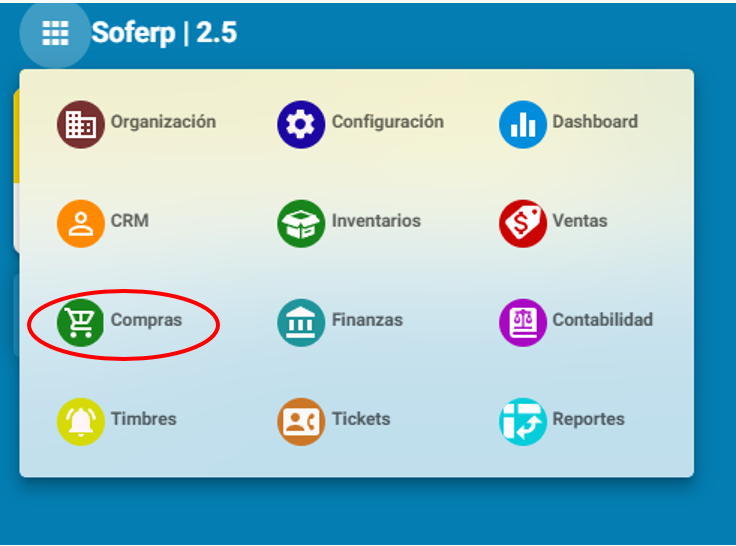
<span lang="ES" style="font-size: 12.0pt; font-family: 'Cambria',serif; mso-bidi-font-family: Calibri; mso-bidi-theme-font: minor-latin; color: #202124; background: white;">1. Ingrese</span><span lang="ES" style="font-size: 12.0pt; font-family: 'Cambria',serif; mso-bidi-font-family: Calibri; mso-bidi-theme-font: minor-latin; color: #202124; background: white;"> al sistema de soferp </span>

<span lang="ES" style="font-size: 12.0pt; font-family: 'Cambria',serif; mso-bidi-font-family: Calibri; mso-bidi-theme-font: minor-latin; color: #202124; background: white;">Se despliega el menú principal de los módulos y seleccionamos el módulo de “compras”.</span>

<span lang="ES" style="font-size: 12.0pt; font-family: 'Cambria',serif; mso-bidi-font-family: Calibri; mso-bidi-theme-font: minor-latin; color: #202124; background: white;"> </span>

[![image.png](https://docs.soferp.com/uploads/images/gallery/2025-04/scaled-1680-/hsoimage.png)](https://docs.soferp.com/uploads/images/gallery/2025-04/hsoimage.png)

*<span lang="ES" style="font-family: 'Cambria',serif; mso-bidi-font-family: Calibri; mso-bidi-theme-font: minor-latin; color: #202124; background: white;"> </span>*

<span lang="ES" style="font-family: 'Cambria',serif; mso-bidi-font-family: Calibri; mso-bidi-theme-font: minor-latin; color: #202124; background: white; mso-no-proof: yes;"> </span>

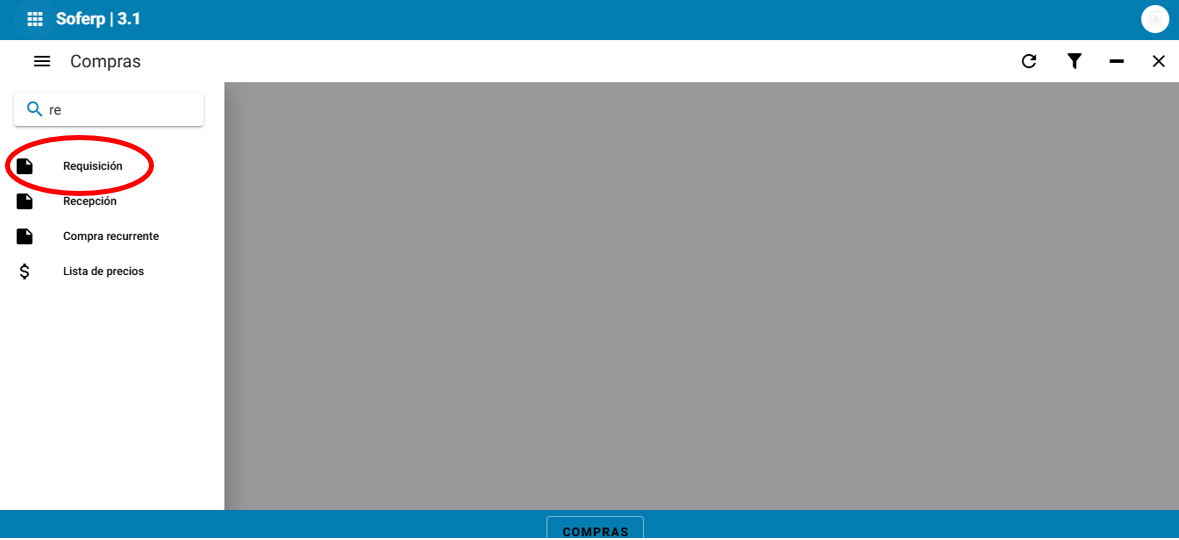
**<span lang="ES" style="font-family: 'Cambria',serif;"> </span>**<span lang="ES" style="font-family: 'Cambria',serif; mso-bidi-font-family: Calibri; mso-bidi-theme-font: minor-latin; color: #202124; background: white;">Ingrese al menú, y seleccione el apartado de requisición.</span>

*<span lang="ES" style="font-family: 'Cambria',serif; mso-bidi-font-family: Calibri; mso-bidi-theme-font: minor-latin; color: #202124; background: white;"> </span>*

[![image.png](https://docs.soferp.com/uploads/images/gallery/2025-04/scaled-1680-/vJximage.png)](https://docs.soferp.com/uploads/images/gallery/2025-04/vJximage.png)

<span lang="ES" style="font-size: 8.5pt; mso-bidi-font-size: 12.0pt; font-family: 'Cambria',serif;"> </span>

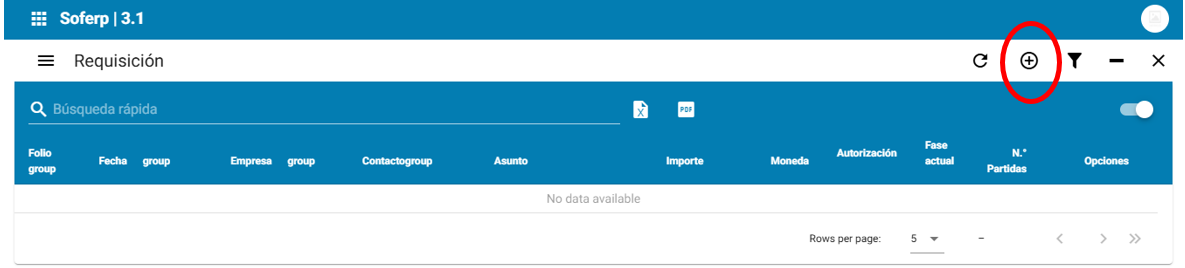
<span lang="ES" style="font-family: 'Cambria',serif; mso-bidi-font-family: Calibri; mso-bidi-theme-font: minor-latin; color: #202124; background: white;">Para añadir una nueva requisición, se debe seleccionar el botón “+” indicado a continuación.</span>

<span lang="ES" style="font-family: 'Cambria',serif; mso-bidi-font-family: Calibri; mso-bidi-theme-font: minor-latin; color: #202124; background: white;"> </span>

[![image.png](https://docs.soferp.com/uploads/images/gallery/2025-04/scaled-1680-/TrCimage.png)](https://docs.soferp.com/uploads/images/gallery/2025-04/TrCimage.png)

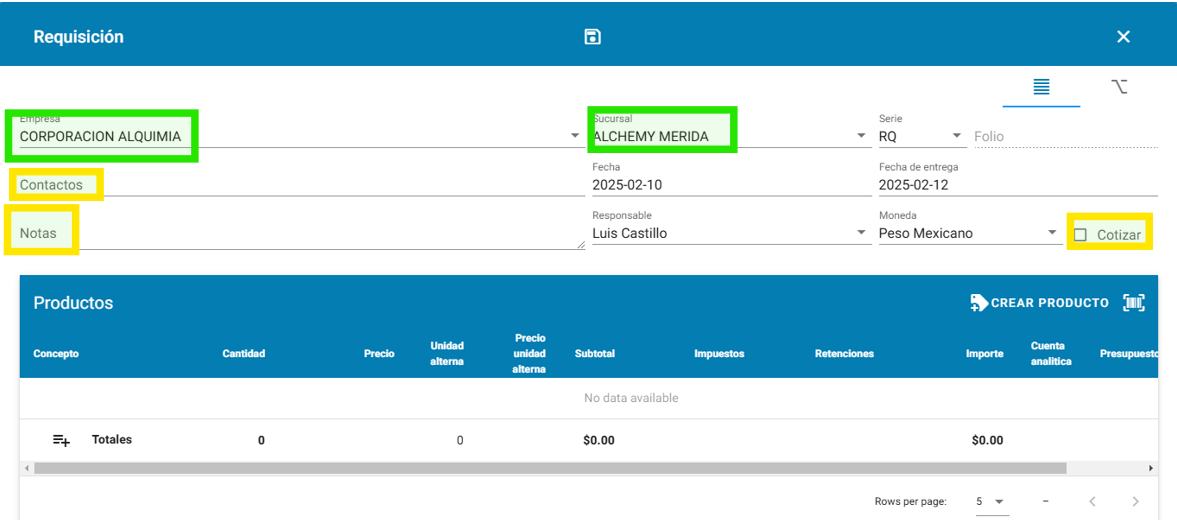
<span lang="ES" style="font-family: 'Cambria',serif; mso-bidi-font-family: Calibri; mso-bidi-theme-font: minor-latin; color: #202124; background: white;">Se deb</span><span lang="ES" style="font-family: 'Cambria',serif; mso-bidi-font-family: Calibri; mso-bidi-theme-font: minor-latin; color: black; mso-themecolor: text1; background: white;">en</span><span lang="ES" style="font-family: 'Cambria',serif; mso-bidi-font-family: Calibri; mso-bidi-theme-font: minor-latin; color: #202124; background: white;"> llenar los campos solicitados a continuación (nota: los campos contactos, notas y el check de cotizar son opcionales de acuerdo a </span><span lang="ES" style="font-family: 'Cambria',serif; mso-bidi-font-family: Calibri; mso-bidi-theme-font: minor-latin; color: black; mso-themecolor: text1; background: white;">las necesidades del modelo).</span>

<span lang="ES" style="font-family: 'Cambria',serif; mso-bidi-font-family: Calibri; mso-bidi-theme-font: minor-latin; color: #202124; background: white;"> </span>

[![image.png](https://docs.soferp.com/uploads/images/gallery/2025-04/scaled-1680-/C4Ximage.png)](https://docs.soferp.com/uploads/images/gallery/2025-04/C4Ximage.png)

<span lang="ES" style="font-family: 'Cambria',serif; mso-bidi-font-family: Calibri; mso-bidi-theme-font: minor-latin; color: #202124; background: white;"> </span>

<span lang="ES" style="font-family: 'Cambria',serif; mso-bidi-font-family: Calibri; mso-bidi-theme-font: minor-latin; color: #202124; background: white;">De igual manera, se debe introducir todos los detalles de la requisición de la siguiente manera:</span>

<span lang="ES" style="font-family: 'Cambria',serif; mso-bidi-font-family: Calibri; mso-bidi-theme-font: minor-latin; color: #202124; background: white;"> </span><span lang="ES" style="font-family: 'Cambria',serif; mso-bidi-font-family: Calibri; mso-bidi-theme-font: minor-latin; color: #202124; background: white;">1.1- Si el producto de la requisición se encuentra dado de alta, se debe seleccionar el ícono “+”.</span>

<span><span lang="ES" style="font-family: 'Cambria',serif; mso-bidi-font-family: Calibri; mso-bidi-theme-font: minor-latin; color: #202124; background: white; mso-no-proof: yes;"> </span></span>

**<span lang="ES" style="font-size: 14.0pt; font-family: 'Cambria',serif; mso-bidi-font-family: Calibri; mso-bidi-theme-font: minor-latin; color: #202124; background: white;"> </span>**

[![image.png](https://docs.soferp.com/uploads/images/gallery/2025-04/scaled-1680-/eL5image.png)](https://docs.soferp.com/uploads/images/gallery/2025-04/eL5image.png)

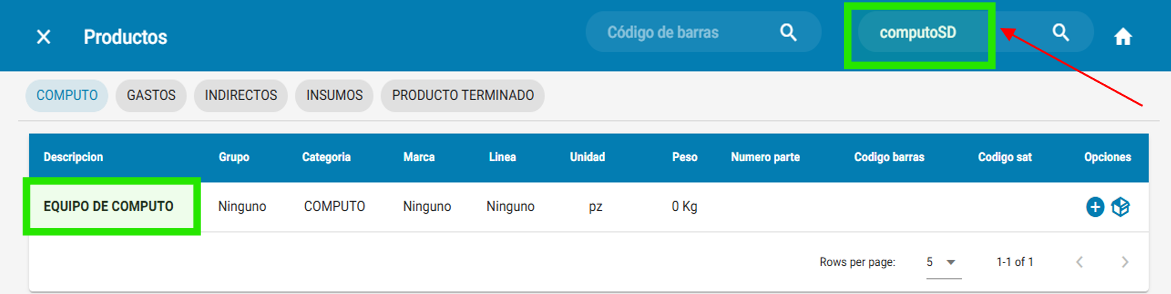
<span lang="ES" style="font-family: 'Cambria',serif; mso-bidi-font-family: Calibri; mso-bidi-theme-font: minor-latin; color: #202124; background: white;">2.1- Se debe seleccionar en la barra de buscador para escribir el producto de la requisición. por ejemplo:</span>

<span lang="ES" style="font-family: 'Cambria',serif; mso-bidi-font-family: Calibri; mso-bidi-theme-font: minor-latin; color: #202124; background: white;"> </span>

[![image.png](https://docs.soferp.com/uploads/images/gallery/2025-04/scaled-1680-/Hzfimage.png)](https://docs.soferp.com/uploads/images/gallery/2025-04/Hzfimage.png)

<span lang="ES" style="font-family: 'Cambria',serif; mso-bidi-font-family: Calibri; mso-bidi-theme-font: minor-latin; color: #202124; background: white;"> </span>

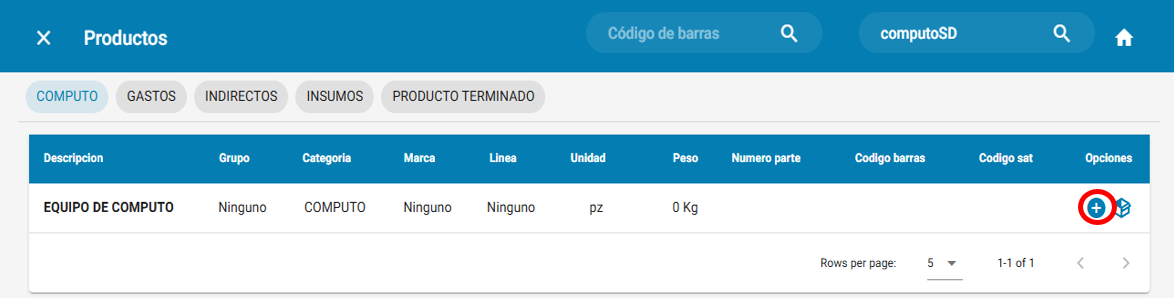
<span lang="ES" style="font-family: 'Cambria',serif; mso-bidi-font-family: Calibri; mso-bidi-theme-font: minor-latin; color: #202124; background: white;"> </span><span lang="ES" style="font-family: 'Cambria',serif; mso-bidi-font-family: Calibri; mso-bidi-theme-font: minor-latin; color: #202124; background: white;">3.1- Para seleccionar el producto buscado se debe pulsar el ícono “+”.</span>

[![image.png](https://docs.soferp.com/uploads/images/gallery/2025-04/scaled-1680-/qBuimage.png)](https://docs.soferp.com/uploads/images/gallery/2025-04/qBuimage.png)

<span lang="ES" style="font-family: 'Cambria',serif; mso-bidi-font-family: Calibri; mso-bidi-theme-font: minor-latin; color: #202124; background: white;"> </span>

<span><span lang="ES" style="font-family: 'Cambria',serif; mso-bidi-font-family: Calibri; mso-bidi-theme-font: minor-latin; color: #202124; background: white; mso-no-proof: yes;"> </span></span>

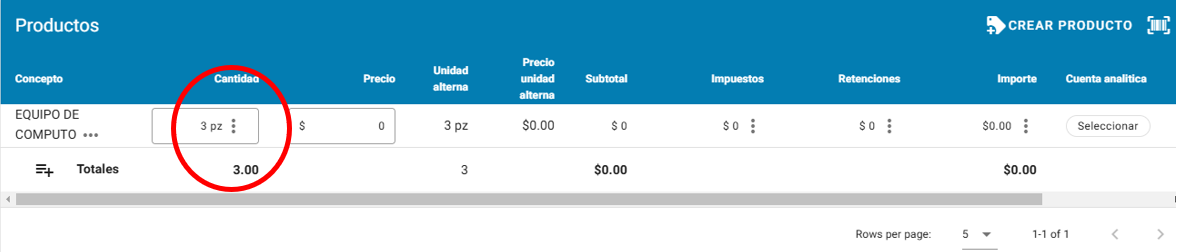
<span lang="ES" style="font-family: 'Cambria',serif; mso-bidi-font-family: Calibri; mso-bidi-theme-font: minor-latin; color: #202124; background: white;">4.1- Se indica las piezas que se solicitan en el apartado de “cantidad”.</span>

<span lang="ES" style="font-family: 'Cambria',serif; mso-bidi-font-family: Calibri; mso-bidi-theme-font: minor-latin; color: #202124; background: white;"> </span>

[![image.png](https://docs.soferp.com/uploads/images/gallery/2025-04/scaled-1680-/UEaimage.png)](https://docs.soferp.com/uploads/images/gallery/2025-04/UEaimage.png)

<span lang="ES" style="font-family: 'Cambria',serif; mso-bidi-font-family: Calibri; mso-bidi-theme-font: minor-latin; color: #202124; background: white;"> </span>

<span lang="ES" style="font-family: 'Cambria',serif; mso-bidi-font-family: Calibri; mso-bidi-theme-font: minor-latin; color: #202124; background: white;"> </span>

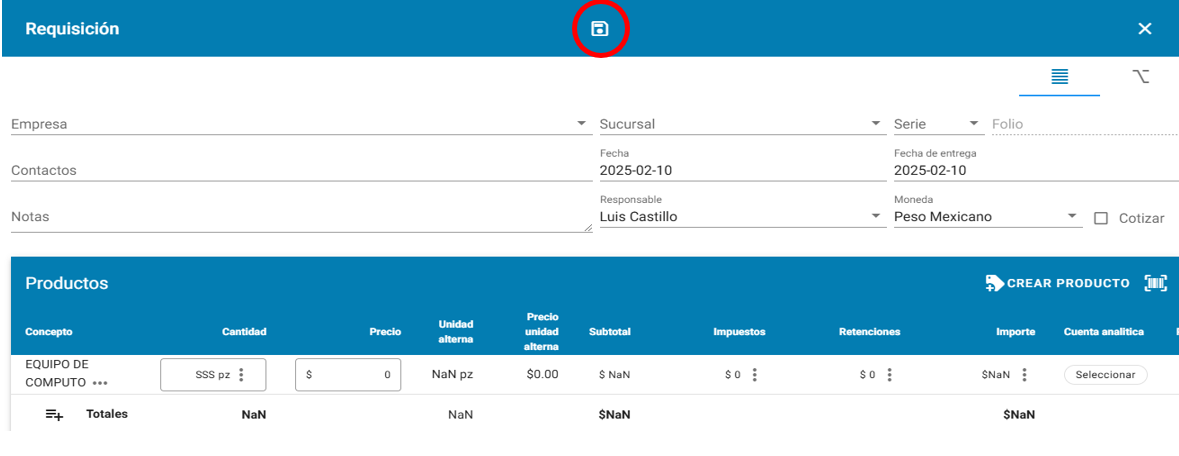
<span lang="ES" style="font-family: 'Cambria',serif; mso-bidi-font-family: Calibri; mso-bidi-theme-font: minor-latin; color: #202124; background: white;">5.1- Una vez indicado la cantidad de piezas, se debe guardar la requisición en el ícono de guardar que se encuentra en la parte superior de la barra de herramientas.</span>

<span lang="ES" style="font-family: 'Cambria',serif; mso-bidi-font-family: Calibri; mso-bidi-theme-font: minor-latin; color: #202124; background: white;"> </span>

[![image.png](https://docs.soferp.com/uploads/images/gallery/2025-04/scaled-1680-/A4timage.png)](https://docs.soferp.com/uploads/images/gallery/2025-04/A4timage.png)

<span lang="ES" style="font-size: 8.5pt; mso-bidi-font-size: 12.0pt; font-family: 'Cambria',serif;"> </span>

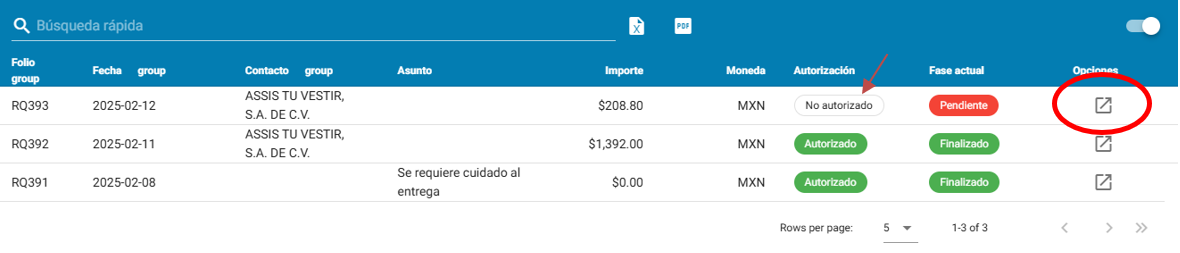
**<span lang="ES" style="font-family: 'Cambria',serif; mso-bidi-font-family: Calibri; mso-bidi-theme-font: minor-latin; color: #202124; background: white;"> </span>**<span lang="ES" style="font-family: 'Cambria',serif; mso-bidi-font-family: Calibri; mso-bidi-theme-font: minor-latin; color: #202124; background: white;">Al momento de guardar una requisición se refleja como estatus “no autorizado” y para realizar la solicitud se debe ingresar al apartado de “opciones”.</span>

<span lang="ES" style="font-family: 'Cambria',serif; mso-bidi-font-family: Calibri; mso-bidi-theme-font: minor-latin; color: #202124; background: white;"> </span>

[![image.png](https://docs.soferp.com/uploads/images/gallery/2025-04/scaled-1680-/lXWimage.png)](https://docs.soferp.com/uploads/images/gallery/2025-04/lXWimage.png)

<span lang="ES" style="font-family: 'Cambria',serif; mso-bidi-font-family: Calibri; mso-bidi-theme-font: minor-latin; color: #202124; background: white;"> </span>

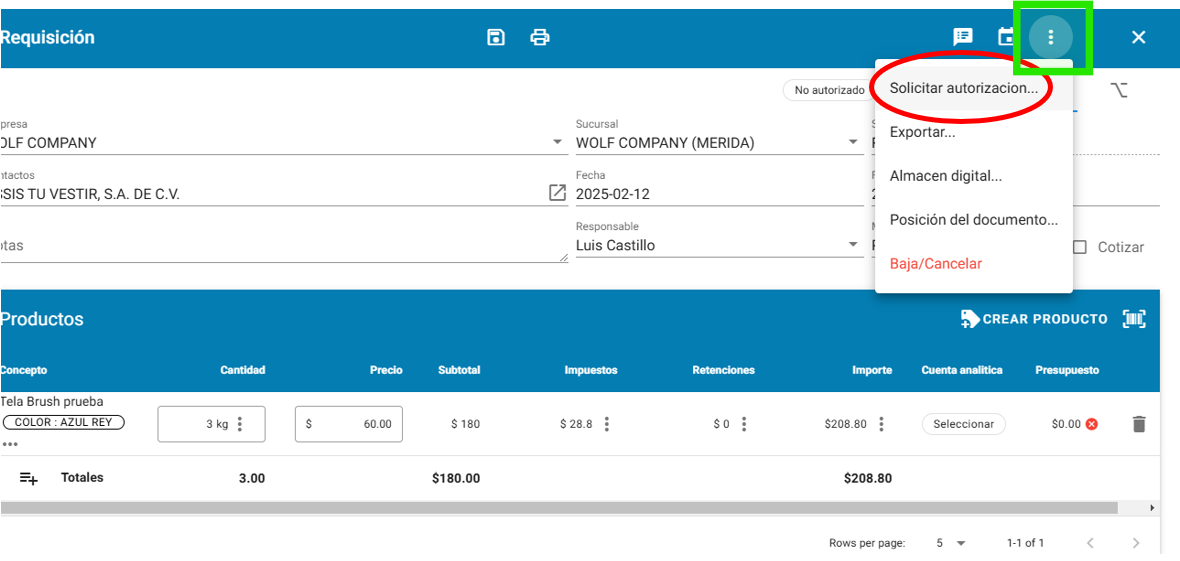
<span lang="ES" style="font-family: 'Cambria',serif; mso-bidi-font-family: Calibri; mso-bidi-theme-font: minor-latin; color: #202124; background: white;">Se debe solicitar el permiso para que sea autorizado seleccionando la opción “solicitar autorización”. </span>

<span lang="ES" style="font-family: 'Cambria',serif; mso-bidi-font-family: Calibri; mso-bidi-theme-font: minor-latin; color: #202124; background: white;"> </span>

[![image.png](https://docs.soferp.com/uploads/images/gallery/2025-04/scaled-1680-/Hnuimage.png)](https://docs.soferp.com/uploads/images/gallery/2025-04/Hnuimage.png)

<span lang="ES" style="font-family: 'Cambria',serif; color: red; mso-no-proof: yes;"> </span>

<span lang="ES" style="font-family: 'Cambria',serif; color: red;"> </span>

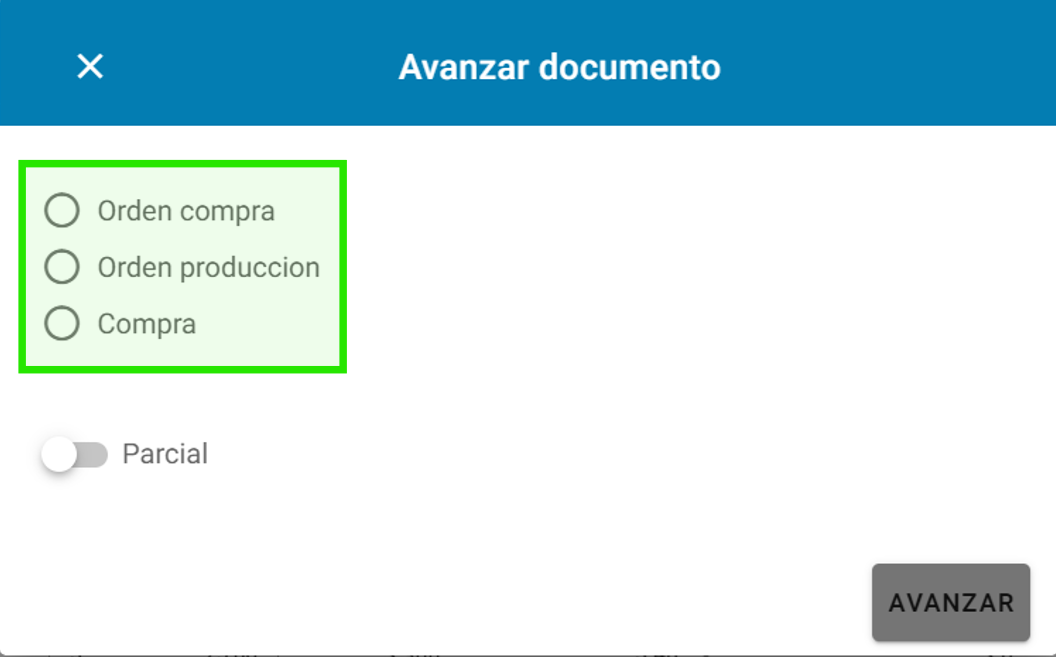
<span lang="ES" style="font-family: 'Cambria',serif; mso-bidi-font-family: Calibri; mso-bidi-theme-font: minor-latin; color: #202124; background: white;">Una vez autorizado el documento requisición, al avanzar el documento se pueden generar los siguientes documentos.</span>

<span lang="ES" style="font-family: 'Cambria',serif; mso-bidi-font-family: Calibri; mso-bidi-theme-font: minor-latin; color: #202124; background: white;"> </span>

[![image.png](https://docs.soferp.com/uploads/images/gallery/2025-04/scaled-1680-/uVeimage.png)](https://docs.soferp.com/uploads/images/gallery/2025-04/uVeimage.png)

<span lang="ES" style="font-family: 'Cambria',serif; mso-bidi-font-family: Calibri; mso-bidi-theme-font: minor-latin; color: red; background: white;"> </span>

<span lang="ES" style="font-family: 'Cambria',serif; mso-bidi-font-family: Calibri; mso-bidi-theme-font: minor-latin; color: #202124; background: white;"> </span>

<span lang="ES" style="font-family: 'Cambria',serif; mso-bidi-font-family: Calibri; mso-bidi-theme-font: minor-latin; color: #202124; background: white;"> </span>

<span lang="ES" style="font-family: 'Cambria',serif; mso-bidi-font-family: Calibri; mso-bidi-theme-font: minor-latin; color: #202124; background: white;"> </span>

<span lang="ES" style="font-family: 'Cambria',serif; mso-bidi-font-family: Calibri; mso-bidi-theme-font: minor-latin; color: #202124; background: white;"> </span>

<span lang="ES" style="font-family: 'Cambria',serif; mso-bidi-font-family: Calibri; mso-bidi-theme-font: minor-latin; color: #202124; background: white;"> </span>